
For staff
How customers redeem their reward
It takes less than a minute. The customer does it all on their phone – you just check the coupon and give the reward.
The customer shows the coupon
The customer opens the coupon in the Løbeklubben app under the Coupons tab. It shows your shop, the reward and the terms.
Check the reward
Check that the coupon is for your shop and that what the customer is buying matches the terms.
Scan the tag
The customer taps redeem and holds their phone right up to the Løbeklubben tag at the till.
Give the reward
When the phone shows “Coupon valid”, it’s approved. Give the discount or the item – done.
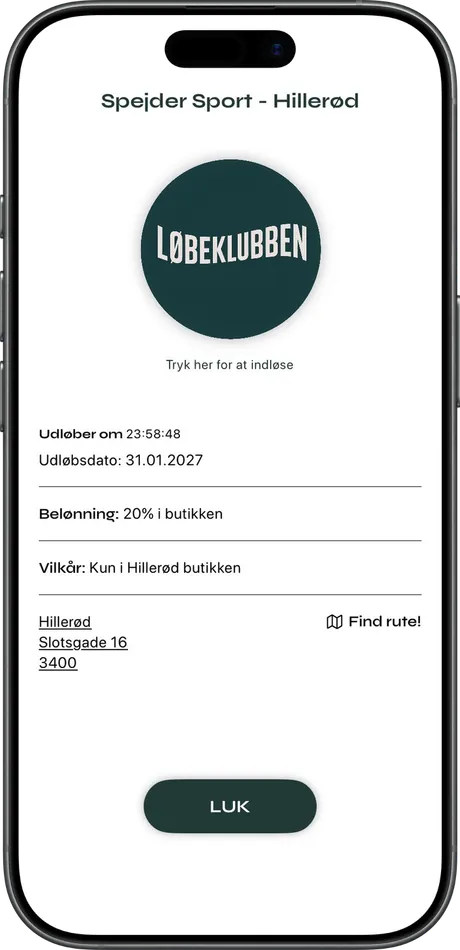
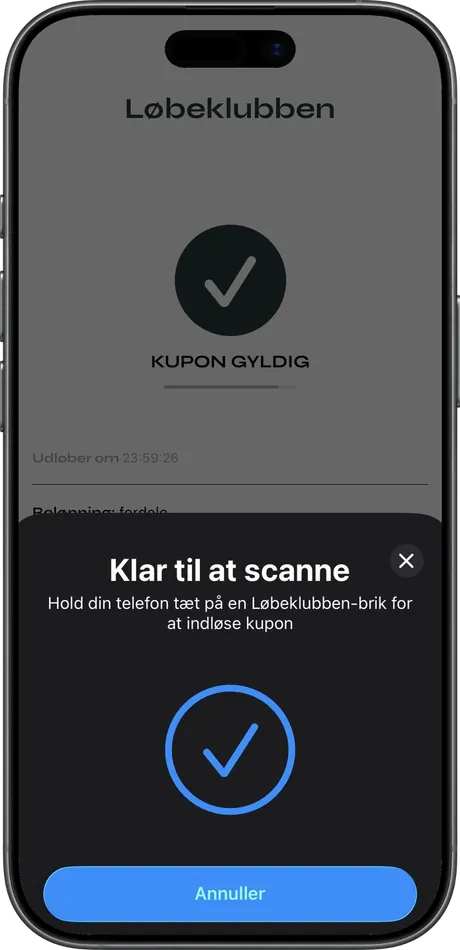
What it looks like
Left: the coupon the customer shows you. Right: the screen once the tag has been scanned and the coupon is approved.
If something isn’t working
The tag doesn’t respond
Ask the customer to hold the top of their phone right up to the tag for a few seconds. If it still doesn’t work, try again or contact us.
The coupon has expired
A coupon must be redeemed within 24 hours – the time is shown on the coupon. Once it has expired, it can’t be used.
Can a coupon be used more than once?
No. Each coupon can only be redeemed once.
The customer wants to use the reward on an age-restricted item
Check their age as you normally would. Offers on e.g. alcohol are only for customers aged 18 and over.
The customer has a discount code
Discount codes are used in your webshop and aren’t scanned in store.
Other questions?
Email info@loebeklubben.dk and we’ll help.